Grow A Military Codes for 2026: Free Rewards and How to Redeem
Roblox players who want a head start in Grow A Military can still claim a free reward by redeeming the active code UPDATE. According to the latest code tracker, this code grants A Trooper, giving players an additional unit or character to use as they build and expand their military base. The code remains available as of 2026, but Roblox codes are known for expiring quickly, so redemption should happen as soon as possible. Developers often release codes to celebrate milestones, game updates, or special events, and they can disappear without warning. Because of that, players are encouraged to check for new Grow A Military codes regularly and to redeem any working code before it becomes invalid.

All Working Grow A Military Codes
The current active code list is short, but the reward is still useful for new and returning players. The table below summarizes the available code and its in-game reward.
| Code | Rewards |
|---|---|
| UPDATE | A Trooper |
At the moment, UPDATE is the only confirmed working code. Players should enter it exactly as shown, because Roblox code redemption is usually case-sensitive. If the code does not work, it may have expired between updates, or it may have reached its redemption limit. The developers have not announced a specific expiration date, which makes quick redemption even more important.
Expired Grow A Military Codes
At the time of writing, there are no expired codes listed for Grow A Military. That is good news for players who are new to the experience, because it means they have not missed any previously available rewards. However, the absence of expired codes does not guarantee that UPDATE will remain active forever. Roblox developers frequently rotate codes, especially after major patches or seasonal events. A code that works today can stop working tomorrow, so the safest approach is to redeem it immediately.
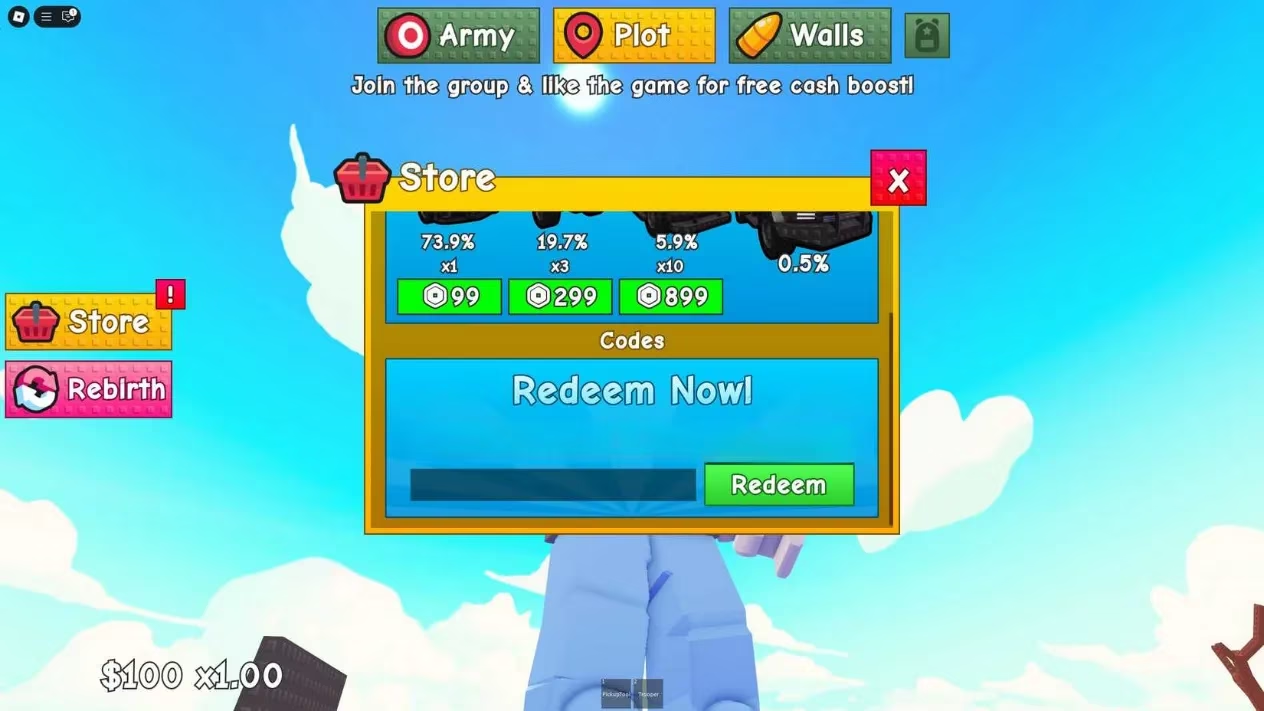
How To Redeem Codes In Grow A Military
Redeeming codes in Grow A Military is a straightforward process. Players do not need to leave the game or visit an external website. The redemption option is built directly into the Roblox experience. Here is the step-by-step process:
-
Open Grow A Military on Roblox.
-
Click on the Store button, which is located on the left side of the screen.
-
Scroll down to find the codes section.
-
Enter the code into the empty field. For the current reward, type UPDATE.
-
Click on the Redeem button to receive the reward.
After redeeming the code, players should see a confirmation message or notice the new Trooper in their inventory. If nothing happens, they should double-check the spelling, remove any accidental spaces, and make sure the code has not already been used on that account. Some Roblox codes are one-time use only, while others may be limited to a certain number of redemptions. In either case, acting quickly improves the chances of success.
Why Grow A Military Codes Matter
Codes are a popular part of the Roblox ecosystem because they give players free items, boosts, or units without requiring Robux. In Grow A Military, the UPDATE code provides A Trooper, which can help players strengthen their military setup. For newcomers, free rewards can make the early game smoother. For experienced players, codes can add variety or fill gaps in their collection. Even when the reward seems small, it can contribute to long-term progression and make the overall experience more enjoyable.
Developers often use codes as a marketing tool. They may share them on social media, in community servers, or during special celebrations. This means the code list can change after updates, holidays, or player milestones. Players who want to stay informed should check reliable code trackers and official community channels regularly. They should also avoid third-party generators or suspicious websites, because those are not necessary for redeeming official Roblox codes.
What Players Should Expect in 2026
As 2026 continues, Grow A Military may receive new updates that bring additional codes. The current list only includes UPDATE, but future patches could introduce codes for new units, cosmetic items, or temporary boosts. Roblox developers sometimes release codes when a game reaches a player count milestone, when a new season begins, or when a major bug fix is deployed. Because of this, players should treat the current list as a snapshot rather than a permanent record.
It is also worth noting that expired codes can pile up over time. When that happens, players should not assume that a code is broken. Instead, they should verify whether it has been officially retired. The current Grow A Military list has no expired entries, which makes the redemption process simple for now. If that changes, players will need to focus only on the active section.
Final Thoughts
The working Grow A Military code for 2026 is UPDATE, and it rewards A Trooper. Players can redeem it by opening the game, clicking the Store button, scrolling to the codes section, entering the code, and pressing Redeem. Since Roblox codes expire quickly and developers can remove them at any time, the best strategy is to claim the reward immediately. Those who do will get a free boost to their military progression and can continue building their forces without spending extra Robux.
Details are provided by Rock Paper Shotgun, a long-running games outlet known for clear explainers and practical player-focused coverage; applying that mindset to Grow A Military, it’s smart to treat codes like UPDATE as time-sensitive bonuses, redeem them immediately, and keep an eye on update notes and community posts so you don’t miss newly added rewards or limited-time redemptions after major patches.
Comments